


capture
Industrial DataOps for AI, Apps & Agents.
Capture connects PLCs, SCADA, and sensors, structures what they produce, and makes it usable for IT, OT, and AI. Out of the box for production teams or as open infrastructure integrators build on from day one.

Running in production at





Most OT data projects take months before anyone sees a dashboard. With Capture, you get a live tag on day one.
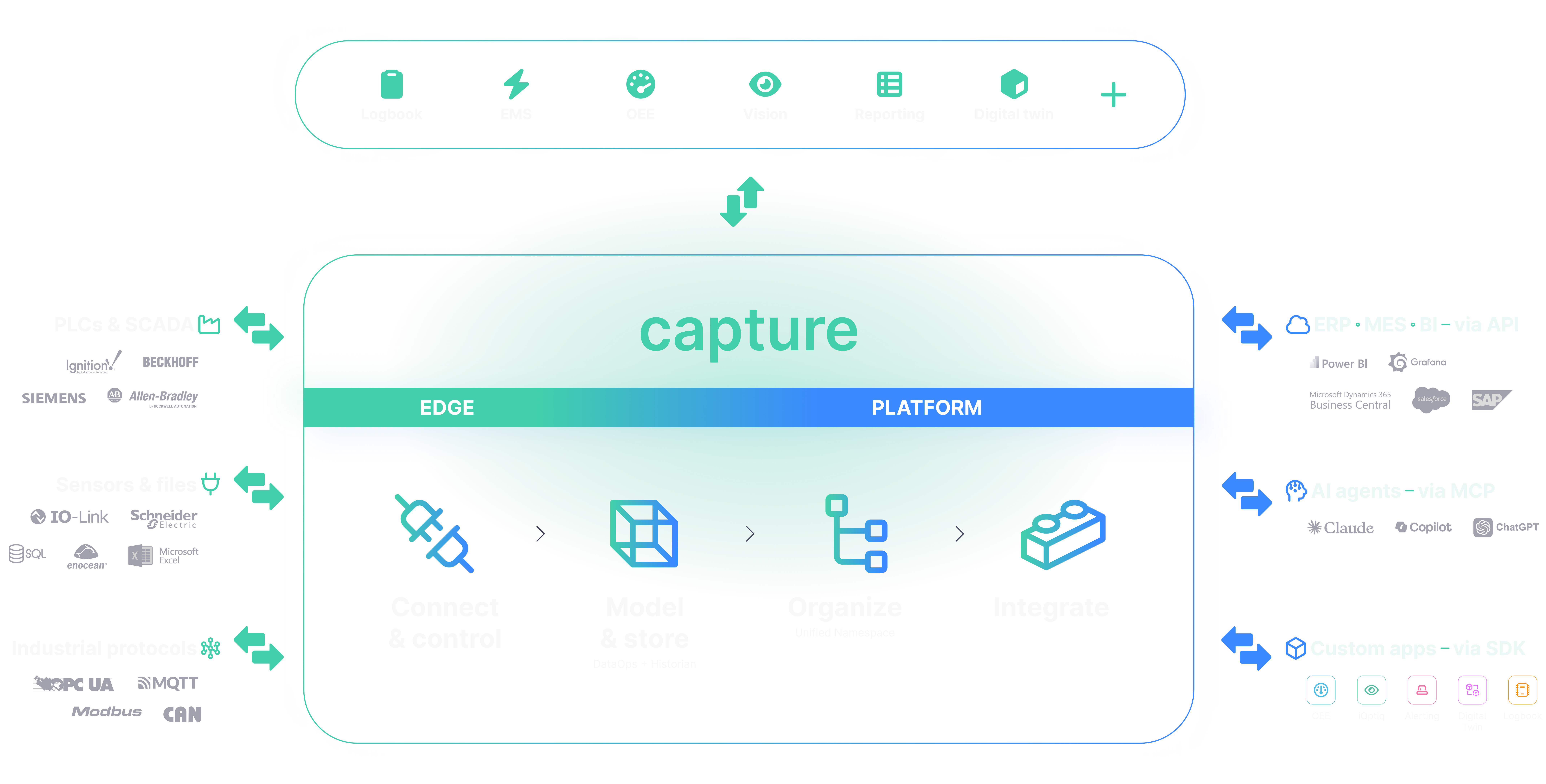
Capture is an industrial data platform that connects PLCs and SCADA, structures the data in a Unified Namespace and historian, and makes it available to IT, BI, and AI. It runs next to what you already have — you don't rip anything out, and you don't install a new control system. Capture Edge reads and writes over whatever protocols your floor already speaks, buffers the data locally, and syncs it to Capture Platform once the connection comes back.
From there, the data lands in one Unified Namespace and one historian. IT, BI, and AI all query that same source. You build the integration once, and every project after the first one reuses it. That's why this moves fast.
TIME TO VALUE

Using Capture = fixing problems
THE PROBLEM
Every machine speaks a different protocol
Capture Edge reads OPC UA, MQTT, Modbus, EtherCAT, Siemens S7, and Beckhoff the same way so one connection method covers the plant.
THE PROBLEM
IT can't reach OT data without opening the network.
The Unified Namespace structures data at Capture Edge and shares that model outward - IT reads from it without the operational network ever being opened.
THE PROBLEM
Querying data, building a dashboard, or adding a tag means knowing Python, SQL, or OPC UA.
Capture drops the technical layer. Talk to it in plain language through your own AI agent, and let the agent build the query, the tag, or the dashboard.
THE PROBLEM
A dropped connection means lost production history.
Capture Edge buffers on-site and syncs once the network is back. Nothing falls in the gap.
Recognize more than one of these?

Every source in, every system out.
Capture sits in the middle — collecting from the floor on one side, serving IT and AI on the other.
Want to see this running against your own PLCs?
Fifteen features. Start with the one you need first.

Unified Namespace
One event-driven model for every tag, on every line, instead of point-to-point connections between every system that wants a piece of it.

Captain
An LLM with access to your documentation and live data - ask it what's happening on line 4.


ALSO INCLUDES
Sources, Reporting, Grafa Dashboards, App Studio, NodeRed Integration, Grafana Energy Monitoring, Logbook
Three plants, three different problems.
See Capture running.


FAQ
Does Capture replace my SCADA or PLCs?
No. Capture runs next to your existing PLCs and SCADA — you don't rip anything out or install a new control system.
What protocols does Capture support?
OPC UA, MQTT, Modbus, EtherCAT, Siemens S7, and Beckhoff, among others.
Is Capture cloud, on-premise, or edge?
All three. Capture Platform deploys on edge, on-premise, or in AWS, Azure, and GCP — Capture Edge always runs on-site.
How long before I see real data?
Most deployments get a live tag on Capture Cloud in under 2 hours.
Can I connect my own AI agent or build my own app?
Yes — Capture exposes an open API, MCP for AI agents like Claude and Copilot, and an SDK for custom apps.
Who is Capture built for?
Production companies who want OT data available to IT and AI out of the box, and OT system integrators who want infrastructure to build client projects on from day one.
One platform to optimize
every aspect of your industry